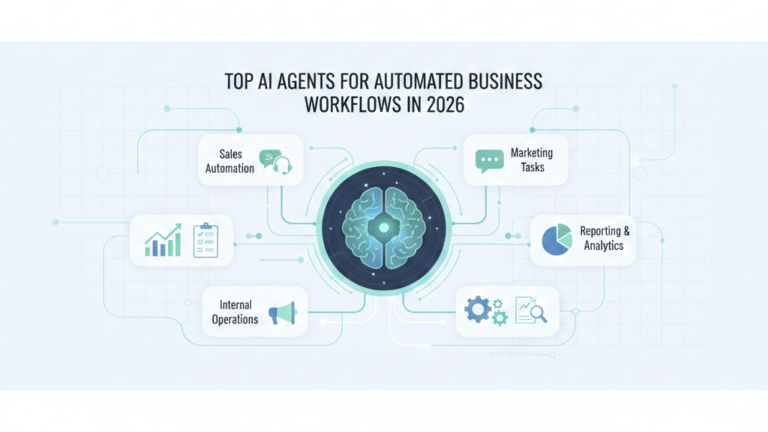

AI agents automate business workflows by independently planning, executing, and improving tasks like sales follow-ups, support handling, reporting, and internal operations. In 2026, the best AI agents act like digital team members working across tools, making decisions, and reducing manual effort.
But not all AI agents are built for real business workflows. Let’s break down the top AI agents in 2026 that actually help businesses save time, cut costs, and scale operations.
What Is an AI Agent (In Simple Terms)
If you’ve used ChatGPT or any AI chatbot, you’ve interacted with an AI tool. But AI agents? They’re fundamentally different.
An AI tool waits for your input, responds, and stops. An AI agent understands your goal, breaks it into steps, executes those steps across multiple tools, and learns from what works. Think of it this way: a chatbot is like a very smart intern who answers questions. An AI agent is like a team member who owns a process end-to-end.
Here’s what separates AI agents from traditional automation:
AI agents can understand goals in plain language. You don’t need to map out every step. Tell an agent “qualify these leads and schedule calls with the promising ones,” and it figures out how.
They take actions across multiple tools. An agent might read your CRM, draft an email, check a calendar, send the message, and log the interaction—all without you clicking anything.
They learn from outcomes. When an agent’s email gets better response rates, it notices. When a workflow fails, it adjusts. This isn’t just running a script; it’s adaptive execution.
Why does this matter more in 2026 than ever before? Because the gap between “AI that sounds smart” and “AI that actually does work” has finally closed. Chatbots were impressive. AI agents are useful.
The businesses winning right now aren’t the ones with the fanciest AI models. They’re the ones using AI agents to handle the boring, repetitive work that eats up half their team’s day.
How AI Agents Automate Business Workflows
Let’s get specific. Here’s how AI agents actually work inside real businesses:
Sales workflow automation happens when an agent monitors your inbound leads, scores them based on fit, drafts personalized outreach, sends follow-ups, and books meetings with qualified prospects. Your sales team wakes up to a calendar full of real conversations, not admin work.
Customer support automation means an agent reads incoming tickets, categorizes them, handles the simple ones automatically, escalates complex issues to the right person with full context, and tracks resolution. Your support team focuses on hard problems, not repetitive questions.
Marketing execution looks like an agent analyzing campaign performance, adjusting ad spend based on what’s working, drafting social posts that match your brand voice, scheduling content, and compiling weekly reports. Your marketing team spends time on strategy, not spreadsheets.
Internal operations get handled when an agent processes expense reports, routes approval requests to the right managers, generates monthly reports, tracks project status, and sends reminders about overdue tasks. Your operations team stops being the bottleneck.
Multi-tool coordination is where agents truly shine. A single agent might pull data from your CRM, cross-reference it with your analytics platform, update a spreadsheet, send a summary to Slack, and create action items in your project management tool. All of this happens based on one trigger: “generate our weekly pipeline review.”
The pattern you’ll notice: AI agents don’t just do one task faster. They eliminate the friction between tasks. That’s where the real time savings live.
Criteria Used to Rank These AI Agents
We didn’t pick these agents because they have the best marketing or the most funding. We picked them based on what actually matters when you’re trying to run a business.
Real workflow automation is the first filter. If an agent can only chat or generate text, it didn’t make this list. We’re looking for agents that execute tasks, move data, and coordinate across systems.
Tool integrations determine usefulness. An agent that works with your CRM, email, calendar, docs, analytics, and project management tools beats an agent with a prettier interface but limited connections.
Autonomy level separates assistants from agents. We favor tools that can run workflows with minimal hand-holding. The best agents ask for input when needed but don’t require constant supervision.
Business use cases matter more than impressive demos. We prioritized agents that solve common business problems: lead management, customer support, reporting, approvals, coordination. Niche agents for specialized industries got deprioritized.
Ease of setup determines adoption. If your team can’t figure out how to use an agent in a few hours, it won’t get used. We looked for agents that balance power with usability.
Scalability for teams is the final test. Agents that work for solo founders but break when a team uses them aren’t ready for business. We want agents that grow with you.
One more thing: we didn’t include any agents we haven’t seen working in actual business contexts. Every agent on this list has real users solving real problems. No vaporware, no “launching soon” promises.
Top AI Agents for Automated Business Workflows in 2026
AutoGPT Enterprise (Business-Grade Agent)
AutoGPT Enterprise takes the open-source AutoGPT framework and makes it business-ready. This isn’t the experimental version you might have tried in 2023—it’s a production-grade system designed for company workflows.
What it does: AutoGPT Enterprise breaks down complex business goals into smaller tasks, executes them across connected tools, and reports back with results. You give it objectives like “research our top 50 prospects and create personalized outreach plans,” and it handles the research, data gathering, analysis, and draft creation.
Best use cases: Market research and competitive analysis work particularly well. So does content creation at scale, customer data enrichment, and multi-step operational workflows that require gathering information from different sources and synthesizing it.
Key workflows it automates: Lead research and qualification, competitive intelligence gathering, content brief development, data migration and cleaning, report generation from multiple data sources.
Who should use it: Mid-sized companies with technical teams who can handle setup and customization. If you have a developer who can spend a week getting AutoGPT configured for your stack, the payoff is substantial. Not ideal for non-technical teams.
Limitations: Requires meaningful setup time and technical knowledge. Can produce inconsistent results on highly creative tasks. Needs regular monitoring to catch when it goes off track. Not plug-and-play.
Microsoft Copilot Studio Agents
Copilot Studio Agents represent Microsoft’s bet on AI agents embedded throughout the enterprise stack. If your business runs on Microsoft 365, Dynamics, or Teams, these agents integrate natively.
What it does: Copilot Studio lets you build custom AI agents that work inside Microsoft applications. These agents can read and write to your business tools, execute workflows, and interact with team members through familiar interfaces.
Best workflows: Meeting summarization and action item tracking in Teams, automated data entry into Dynamics CRM, document analysis and summarization in SharePoint, email drafting and response in Outlook, approval workflows across Microsoft tools.
Why enterprises prefer it: Security and compliance are built in. IT teams can manage permissions centrally. Everything stays inside the Microsoft ecosystem, which matters for regulated industries. The learning curve is minimal if your team already uses Microsoft products.
Ideal company size: Medium to large enterprises already invested in Microsoft 365 or Dynamics. The value increases with the number of Microsoft tools you use.
Limitations: Limited utility outside the Microsoft ecosystem. Customization requires understanding Power Platform. Can feel restrictive compared to more flexible agent platforms. Best features require premium licensing.
OpenAI Operator-Style Agents (Task-Executing Agents)
OpenAI’s operator agents represent a shift from language models to action models. These agents don’t just understand what you want—they go do it.
What they do: Operator-style agents can browse the web, interact with software interfaces, fill forms, extract data, and execute multi-step tasks that previously required a human clicking through applications.
Example business workflows: Data entry from one system to another, form filling for recurring processes, web research with specific extraction criteria, competitive monitoring across multiple sites, price checking and inventory updates.
Why they matter in 2026: They bridge the gap between AI understanding and AI action. When you need something done across web applications that don’t have APIs, operator agents can handle it like a person would—but faster and more consistently.
Best for which teams: Operations teams dealing with legacy systems, businesses that need to pull data from websites without APIs, companies with repetitive web-based workflows.
Limitations: Still relatively new, so expect occasional errors. Doesn’t work well with complex, non-standard interfaces. Can be slower than API-based integrations. Requires clear task definitions to work reliably.
Zapier Central AI Agents
Zapier Central brings AI agents to the no-code automation platform that millions of businesses already use. If you’ve built Zaps, you understand the mental model.
What it does: Central lets you create AI agents that trigger workflows across thousands of connected applications. You describe what you want in plain language, and Central builds and runs the automation.
No-code automation use cases: Lead routing based on conversation analysis, customer support ticket classification and routing, content moderation and approval workflows, data synchronization between tools, event-based notifications and actions.
Business workflow examples: When a support ticket comes in, an agent reads it, determines urgency and category, checks if it’s been asked before, drafts a response if straightforward, or routes it to the right team member with context. All without writing code.
Best for founders and SMBs: Small teams who need automation but don’t have developers. The interface is approachable, the app library is extensive, and you can start simple and add complexity as needed.
Limitations: Complex workflows can get expensive as you scale. Agent capabilities are bounded by Zapier’s integration quality. Advanced customization requires creativity rather than direct control. Monthly task limits matter at scale.
UiPath AI Agents (Enterprise Automation)
UiPath dominated robotic process automation (RPA) before AI agents became mainstream. Now they’ve combined RPA’s precision with AI’s flexibility.
What it does: UiPath AI Agents automate workflows that combine structured processes (RPA) with unstructured decision-making (AI). This is powerful for industries where compliance and audit trails matter as much as efficiency.
RPA plus AI agent workflows: Invoice processing where the agent extracts data, validates it against rules, flags anomalies, and routes for approval. Employee onboarding that combines form processing, system provisioning, and personalized communication. Claims processing that reads documents, assesses validity, and handles simple cases automatically.
Industries it works best for: Financial services, healthcare, insurance, manufacturing, and logistics. Anywhere you have high-volume, rule-based work that still requires judgment.
Strengths: Enterprise-grade security and compliance, detailed audit logs, reliable execution at scale, strong integration with enterprise systems, mature platform with extensive support.
Limitations: Expensive compared to newer agent platforms. Steeper learning curve. Overkill for simple workflows. Best value comes from complex, high-volume processes. Requires dedicated training or consultants for advanced use.
Salesforce Einstein Copilot Agents
Einstein Copilot Agents live inside Salesforce and automate workflows that touch your customer data. If your business runs on Salesforce, these agents are native team members.
What it does: Einstein Agents can read your CRM data, understand customer context, suggest actions, draft communications, update records, and execute workflows without leaving Salesforce.
CRM-based workflow automation: Lead scoring and assignment based on conversation analysis, automated follow-up sequencing based on prospect behavior, case summarization and suggested responses for support teams, opportunity updates based on email and meeting analysis.
Sales and support use cases: A sales rep opens an account, and an agent shows a summary of recent interactions, suggests next best actions, and drafts a personalized email. A support agent gets a case, and Einstein has already categorized it, pulled relevant documentation, and suggested a solution.
Best for Salesforce users: Companies already paying for Salesforce who want to maximize their investment. The deeper your Salesforce implementation, the more valuable these agents become.
Limitations: Locked into the Salesforce ecosystem. Requires Salesforce licenses, which aren’t cheap. Customization requires understanding Salesforce’s architecture. Limited utility for workflows outside of CRM.
Notion AI Workflow Agents
Notion AI Agents automate the internal documentation and knowledge work that happens in Notion workspaces. If your company wiki, project management, and documentation live in Notion, these agents are productivity multipliers.
What it does: Notion AI Agents can read your workspace, understand your documentation structure, generate new content that matches your style, update pages based on triggers, and answer questions using your company knowledge base.
Internal documentation and ops workflows: Meeting notes that automatically generate action items and update project pages, weekly reports compiled from project updates across the workspace, onboarding documentation that stays current as processes change, knowledge base articles created from common questions.
Team productivity use cases: A team finishes a project kickoff meeting, and an agent generates a project brief, creates linked tasks, sets up a project page with the right template, and notifies stakeholders. Product feedback gets logged in different places, and an agent compiles it into a weekly synthesis.
Ideal teams: Startups and scale-ups that live in Notion, remote teams that rely on documentation, operations teams managing internal processes, knowledge-heavy businesses.
Limitations: Only valuable if Notion is your central workspace. Agents work within Notion’s structure, which can feel limiting. Complex automations require understanding Notion’s database logic. Less useful for workflows that span many external tools.
Relevance AI Agents
Relevance AI built their platform specifically for businesses that need custom AI agents without building from scratch. They focus on data-heavy workflows and business intelligence.
What it does: Relevance AI lets you create agents that analyze data, generate insights, automate reporting, and handle operations that require working with large datasets or complex analysis.
Data-driven workflows: Customer feedback analysis across channels, sales pipeline analysis with predictive insights, content performance analysis and optimization recommendations, market research synthesis from multiple sources.
AI-first operations: Companies using Relevance AI often replace manual analysis work with agents that run continuously. Instead of someone spending Friday afternoon compiling the weekly report, an agent does it daily and flags what matters.
Best for data-heavy businesses: Companies where data analysis drives decisions, businesses with large customer datasets needing regular analysis, teams that produce recurring reports from multiple data sources.
Limitations: Learning curve for building effective agents. Best results require clean data inputs. Can be expensive for small-scale use. Requires clear data infrastructure to get full value.
CrewAI (Multi-Agent Systems)
CrewAI takes a different approach: instead of one powerful agent, you create teams of specialized agents that collaborate on complex tasks.
What it does: CrewAI lets you define multiple agents with different roles, skills, and tools. These agents work together, delegate tasks, and combine their outputs to handle workflows that no single agent could manage.
Agent collaboration logic: You might create a research agent that gathers information, an analysis agent that finds patterns, a writing agent that creates content, and a review agent that checks quality. They work sequentially or in parallel, sharing information and building on each other’s work.
Complex workflow handling: Content production workflows where research, writing, editing, and optimization happen in stages. Business strategy projects that require data gathering, analysis, competitive research, and synthesis. Product development workflows that coordinate research, ideation, planning, and documentation.
Who should use it: Technical teams comfortable with code, businesses with complex workflows that benefit from specialized processing at each stage, companies building AI-native operations.
Limitations: Requires coding and setup. Can be overkill for simple workflows. Debugging multi-agent systems is harder than single-agent workflows. Best suited for teams with developers who can manage agent orchestration.
Custom AI Agents (Built for Specific Businesses)
Custom AI agents are built specifically for your business workflows, your data, and your tools. In 2026, more companies are choosing custom over off-the-shelf.
What they are: Custom agents developed using frameworks like LangGraph, AutoGen, or directly with LLM APIs, designed around your exact processes. They integrate with your specific tools, understand your business context, and handle workflows that generic agents can’t.
Why custom agents win in 2026: Off-the-shelf agents serve common use cases. Custom agents handle your competitive advantages—the unique processes that make your business different. When workflow automation becomes table stakes, custom agents create differentiation.
Examples of custom workflows: A recruiting firm built an agent that reads resumes, matches them against job requirements using their proprietary criteria, conducts initial screenings via email, and schedules qualified candidates. An e-commerce company built agents that monitor inventory across suppliers, predict stockouts, automatically reorder based on sales velocity, and alert managers to anomalies.
When to choose custom vs tools: Choose custom when your workflow is genuinely unique, when you need tight integration with proprietary systems, when data security requires on-premise deployment, or when your competitive advantage depends on process automation. Choose off-the-shelf when you’re solving common problems, when time to value matters more than perfect fit, or when you lack technical resources for ongoing maintenance.
Limitations: Requires development resources or budget to hire specialists. Takes longer to build and iterate. You own the maintenance and updates. Need technical expertise to troubleshoot issues.
Comparison Table: Top AI Agents at a Glance
| AI Agent | Best For | Workflow Type | Technical Level | Business Size |
|---|---|---|---|---|
| AutoGPT Enterprise | Complex research and analysis | Multi-step information workflows | High | Mid-sized with tech teams |
| Microsoft Copilot Studio | Microsoft ecosystem users | Office and CRM workflows | Medium | Medium to large enterprises |
| OpenAI Operator | Web-based tasks | Browser automation | Medium | All sizes |
| Zapier Central | No-code automation | Cross-app workflows | Low | Founders and SMBs |
| UiPath AI Agents | High-volume process automation | RPA plus AI workflows | High | Large enterprises |
| Salesforce Einstein | CRM workflows | Sales and support automation | Medium | Salesforce customers |
| Notion AI | Internal documentation | Knowledge and project management | Low | Startups and scale-ups |
| Relevance AI | Data analysis | Business intelligence workflows | Medium | Data-driven businesses |
| CrewAI | Complex multi-stage workflows | Collaborative agent tasks | High | Technical teams |
| Custom AI Agents | Unique business processes | Anything you build | Very High | Companies with dev resources |
Which AI Agent Is Right for Your Business?
Choosing an AI agent isn’t about finding the “best” one—it’s about finding the right match for where you are and what you need.
For startups and founders: Start with Zapier Central or Notion AI. These agents require minimal technical knowledge, integrate with tools you probably already use, and let you automate high-impact workflows quickly. Focus on one workflow that eats up the most time—probably lead management, customer support, or reporting—and automate that first. Success with one workflow builds confidence for expanding.
For SMBs: Consider Zapier Central if you need cross-app automation, Microsoft Copilot Studio if you’re in the Microsoft ecosystem, or Salesforce Einstein if you run on Salesforce. At this stage, you’re balancing capability with complexity. You want agents that your team can manage without dedicated technical staff, but powerful enough to handle real volume.
For enterprises: Look at UiPath if you have complex, high-volume processes requiring audit trails and compliance. Microsoft Copilot Studio makes sense if you’re standardized on Microsoft tools. Salesforce Einstein is the choice if your business runs through Salesforce. At enterprise scale, the integration with existing systems and IT management capabilities matter more than features.
For operations-heavy businesses: UiPath AI Agents handle high-volume, repetitive work reliably. If you process thousands of documents, forms, or transactions that follow patterns but require some judgment, UiPath combines the consistency of traditional automation with AI’s ability to handle variation.
For data-driven teams: Relevance AI focuses specifically on workflows where analysis and insights drive decisions. If your competitive advantage comes from understanding data faster or better than competitors, you need agents that work with data natively, not as an afterthought.
One pattern across all categories: start narrow, then expand. Don’t try to automate everything at once. Pick one workflow causing the most pain, automate it well, learn what works, then move to the next one. Teams that succeed with AI agents think in workflows, not features.
Real-World Business Workflows AI Agents Automate in 2026
Let’s get specific about what “workflow automation” actually means in practice. These are workflows we’ve seen working in real businesses this year:
Lead qualification and follow-ups: An agent monitors inbound leads from your website, enriches contact data using public sources, scores leads based on fit criteria, sends personalized initial outreach, tracks responses, sends follow-up sequences, and books meetings with qualified prospects. Your sales team sees only leads that have been vetted and warmed up.
Support ticket handling: When a customer emails support, an agent reads the message, checks if it matches known issues, pulls relevant documentation or past tickets, drafts a response for simple questions, escalates complex issues with full context to the right team member, and tracks resolution time. Your support team handles difficult problems, not repetitive questions.
Report generation: Every Monday morning, an agent pulls data from your CRM, analytics platform, and financial system, identifies trends and anomalies, generates charts, writes narrative summaries of what changed and why, and distributes customized reports to different stakeholders. Your team starts the week with insights, not spreadsheet work.
Internal approvals: When someone submits an expense report, a time-off request, or a purchase order, an agent validates it against policy, routes it to the appropriate approver with context, sends reminders if it sits too long, and updates the relevant systems when approved. Your operations team stops being the bottleneck for routine approvals.
Vendor coordination: An agent monitors inventory levels, predicts when you’ll need to reorder based on sales velocity, sends purchase orders to vendors, tracks delivery status, updates inventory systems when items arrive, and flags delays or issues. Your supply chain runs without constant manual checking.
Customer onboarding: When a new customer signs up, an agent sends welcome emails, creates accounts in your systems, schedules kickoff calls, assigns an account manager, generates personalized onboarding documentation, and tracks completion of setup steps. Your customers get consistent, timely onboarding without manual coordination.
The common thread: these aren’t impressive demos. They’re boring, repetitive workflows that used to require someone’s time and attention. AI agents don’t make them exciting—they make them automatic.
Key Limitations of AI Agents (Honest Section)
AI agents aren’t magic, and they’re not ready for every workflow. Here’s what actually goes wrong and what you need to watch for.
Hallucinations happen. AI agents can confidently generate incorrect information, especially when they don’t have clear data to work from. An agent summarizing customer feedback might invent trends that don’t exist. An agent drafting emails might state facts that aren’t true. You need verification steps for any workflow where accuracy matters more than speed.
Workflow errors compound. When an agent makes a mistake in step three of a ten-step process, everything after step three is wrong. Unlike a person who might notice something looks off, agents happily continue executing flawed workflows. This means you need monitoring and the ability to pause agents when something’s wrong.
Compliance risks exist. Agents can inadvertently violate data privacy rules, share confidential information with the wrong people, or create records that don’t meet regulatory requirements. If you’re in healthcare, finance, or any regulated industry, you can’t just turn agents loose without thinking through compliance implications.
Over-automation backfires. Some workflows need human judgment, creativity, or relationship-building. Automating customer communication too heavily makes you seem robotic. Automating creative work produces generic output. Automating decision-making without oversight leads to rigid, inflexible operations. The goal isn’t maximum automation—it’s optimal automation.
Human oversight isn’t optional. Even the best AI agents need spot-checking. You need humans reviewing agent outputs, auditing agent decisions, and catching drift when agents develop bad patterns. This doesn’t mean constant micromanagement, but it does mean you can’t set it and forget it.
Context windows create boundaries. Agents struggle when they need to consider large amounts of information simultaneously. A person can keep a complex project in their head. An agent might lose important context when workflows get complicated.
Integration quality varies wildly. An agent is only as good as its ability to work with your tools. Some integrations are robust and reliable. Others are fragile and break when the underlying tool changes. Your agent infrastructure is as strong as its weakest integration.
The businesses succeeding with AI agents in 2026 aren’t the ones pretending these limitations don’t exist. They’re the ones designing workflows that account for them—building in verification, maintaining oversight, and choosing the right problems to automate.
Future of AI Agents in Business (2026–2028)
We’re at an inflection point with AI agents. Here’s where things are heading based on what we’re seeing now.
From assistants to operators: The agents available today mostly assist humans with tasks. The agents coming in the next two years will operate workflows independently. You won’t tell an agent “draft this email”—you’ll tell it “manage customer communication for this segment” and trust it to handle everything unless it needs help.
From tools to digital employees: Companies are starting to think about agents not as software but as headcount. Instead of “should we buy this tool,” the question becomes “should we hire a person or deploy an agent.” The cost comparison increasingly favors agents for repetitive work, which changes hiring and organizational design.
Rise of agent orchestration: Right now, most companies use agents individually for specific workflows. The next phase is agents working together, handing off tasks, coordinating complex projects. We’ll see agent managers that coordinate other agents, similar to how human managers coordinate teams.
AI agents as standard business infrastructure: In two years, having AI agents handle routine workflows will be as standard as having email. Companies without workflow automation will seem as behind as companies without websites seemed in 2010. The competitive question won’t be “should we use AI agents” but “which workflows should humans own.”
What’s less clear is how quickly this happens. Technology often develops slower than we expect in the short term but faster than we expect in the long term. The agents available today work well enough that most businesses could automate significant portions of their operations right now. Most don’t, because organizational change is hard.
The companies gaining an advantage aren’t necessarily the ones with the most advanced AI agents. They’re the ones actually using agents for real work, learning what works, and iterating. By the time AI agents become standard infrastructure, they’ll have years of experience optimizing their workflows.
Final Takeaway
AI agents matter now because the gap between capable AI and useful AI has closed. You don’t need a research lab or a massive budget to automate real business workflows anymore.
How to choose the right one: start with the workflow causing the most pain, pick the agent that integrates with your existing tools and matches your technical capability, automate that one workflow well, then expand. Don’t chase the most powerful agent—chase the one you’ll actually use.
Why workflow-first thinking wins in 2026: the competitive advantage isn’t having AI agents. It’s having deeply optimized workflows that combine human expertise with agent execution. The companies pulling ahead are the ones treating AI agents as permanent team members, investing in training them, and continuously improving their workflows.
The future arrives gradually, then suddenly. AI agents are in the gradual phase—available, useful, but not yet standard. By the time they’re standard, the companies that started early will have years of optimized workflows and won’t be catchable.
Discover more from PratsDigital
Subscribe to get the latest posts sent to your email.