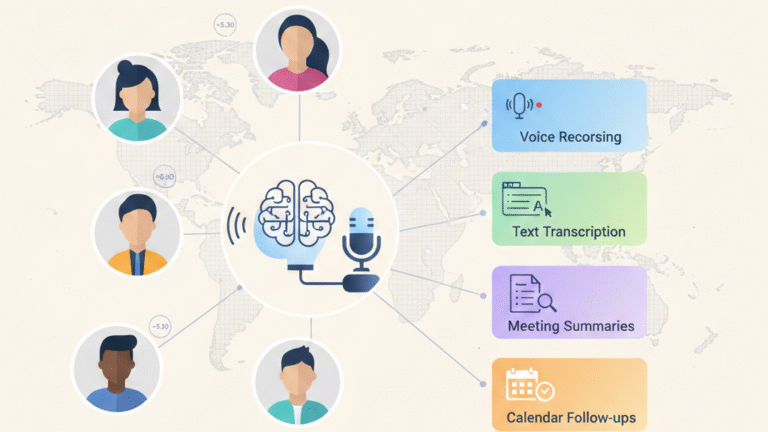

Short answer: AI meeting assistants help global remote teams automatically record meetings, generate summaries, capture action items, and align teams across time zones without relying on manual notes or follow-ups.
For distributed teams working across countries and time zones, the right AI meeting assistant can mean fewer meetings, better clarity, and faster execution. Let’s break down the best AI meeting assistants for global remote teams and how to choose the right one.
What Is an AI Meeting Assistant?
Think of an AI meeting assistant as a silent team member who joins your calls, listens carefully, and takes perfect notes every single time.
Here’s what it actually does:
Records meetings automatically – No more scrambling to hit the record button or asking “Wait, are we recording this?”
Transcribes conversations – Turns speech into searchable text, so you can find that comment Sarah made about pricing two weeks ago.
Creates summaries and action items – Pulls out the decisions, tasks, and key points without you reading through 45 minutes of transcript.
Syncs with your tools – Connects to your calendar, Slack, Notion, or project management system so information flows where your team already works.
Works across video platforms – Whether you’re on Zoom, Google Meet, or Microsoft Teams, it joins and does its job.
The beauty? Nobody has to volunteer to be the note-taker anymore. And nobody leaves the meeting wondering what they’re supposed to do next.
Why Global Remote Teams Need AI Meeting Assistants
Let me paint a picture you’ll probably recognize:
Your engineer in Bangalore has a question about yesterday’s product sync. But that meeting happened at 11pm her time, so she skipped it. Now she’s digging through a messy Google Doc with half-finished notes, trying to piece together what was decided.
Meanwhile, your sales lead in New York is rewatching a 40-minute client call just to find the one moment where the client mentioned their budget timeline.
And your product manager in London is about to schedule another meeting because nobody’s clear on what came out of the last one.
This is the reality for distributed teams:
Time-zone gaps – Someone always misses the meeting. And asking them to join at 3am isn’t sustainable.
Missed context – When people can’t attend live, they lose the nuance, the tone, the energy of the conversation.
Poor documentation – Notes taken during meetings are rushed, incomplete, and often lost in a thread somewhere.
Repeated meetings – When clarity is missing, teams schedule follow-ups to clarify what should have been clear the first time.
Follow-up confusion – “Wait, was I supposed to do that?” becomes a daily question.
Here’s how AI meeting assistants solve this:
They create a single source of truth. Everyone—regardless of timezone—can access the same high-quality summary, transcript, and action items. Attendance becomes optional when information is accessible. Your Bangalore engineer reads the summary over coffee. Your sales lead searches the transcript for “budget” and finds it in 10 seconds. Your product manager shares the AI-generated action items in Slack, and everyone knows exactly what happens next.
You don’t eliminate meetings. You eliminate the chaos around meetings.
How AI Meeting Assistants Work
You don’t need to understand machine learning to use these tools. But it helps to know what’s happening behind the scenes.
Here’s the simple flow:
1. Joins meetings automatically
You connect the tool to your calendar. When a meeting starts, the AI assistant joins as a participant (usually with a name like “Fireflies Notetaker”). No manual setup each time.
2. Records and transcribes conversations
It listens to everyone speaking and converts speech to text in real-time. Most tools handle multiple speakers and label who said what.
3. Identifies key points and decisions
This is where AI earns its keep. It doesn’t just transcribe—it analyzes. It spots decisions, questions, action items, and important moments.
4. Generates summaries and tasks
Within minutes of the meeting ending, you get a summary. Not a wall of text—a structured breakdown of what matters.
5. Shares notes with the team
The summary, transcript, and recording get sent to Slack, email, or your project management tool. Everyone has access immediately.
The whole process is automatic. You talk. It listens. It organizes. It shares.
Criteria Used to Choose the Best AI Meeting Assistants
I didn’t just Google “best meeting tools” and copy-paste a list. Here’s what I actually looked at to evaluate these tools for global teams:
Accuracy of transcription
If the transcript is full of errors, the summary will be garbage. I prioritized tools that handle technical conversations, acronyms, and real-world speech patterns well.
Summary quality
Can it actually identify what matters? Or does it just pull random sentences and call it a summary? The best tools understand context—they know the difference between small talk and a decision.
Time-zone and language support
Global teams need tools that work across accents and languages. I looked at which tools explicitly support multilingual transcription and non-US English accents.
Integrations
Does it play nice with Zoom, Google Meet, Teams, Slack, Notion, Asana, and the other tools your team already uses? Friction kills adoption.
Ease of use for non-technical teams
Your marketing manager shouldn’t need an engineering degree to get this working. I favored tools with simple setup and intuitive interfaces.
Data privacy and security
When you’re recording client calls or internal strategy sessions, you need to know where that data lives and who can access it. I checked for SOC 2 compliance, GDPR compliance, and clear privacy policies.
These criteria matter because a tool might have great AI but terrible privacy practices. Or perfect transcription but zero integrations. For global teams, you need the complete package.
Best AI Meeting Assistants for Global Remote Teams
Here’s the honest breakdown. Each tool has strengths. None is perfect for everyone.
1. Fireflies AI
What it does:
Fireflies joins your meetings, transcribes conversations, generates summaries, and extracts action items. It’s one of the most feature-complete tools on the market.
Best for:
Mid-sized remote teams who need powerful search, integrations, and detailed analytics.
Key features:
- Transcribes meetings across Zoom, Google Meet, Teams, and more
- AI-generated summaries with conversation topics
- Powerful search (find any moment by keyword)
- CRM integrations (Salesforce, HubSpot)
- Speaker tracking and sentiment analysis
- Team analytics (see meeting trends across your org)
Strengths for global teams:
Works across time zones automatically. Team members can review meetings asynchronously. Supports multiple languages. The search function is incredibly useful when someone needs to find a specific discussion from three weeks ago.
Limitations:
The free plan limits transcription hours. The interface can feel overwhelming if you just need basic summaries. Some users report occasional transcription errors with heavy accents.
2. Otter AI
What it does:
Otter focuses on real-time transcription and collaborative note-taking. You can edit transcripts during meetings, add comments, and highlight key moments.
Best for:
Teams who want real-time collaboration and live transcription during meetings.
Key features:
- Live transcription you can follow during the call
- Collaborative editing (multiple people can highlight and comment)
- Speaker identification
- Integration with Zoom, Google Meet, Teams
- Mobile app for recording in-person meetings
- Automated slide capture during presentations
Strengths for global teams:
The live transcription is fantastic for attendees who struggle with accents or fast speech. Non-native English speakers can read along. The mobile app works well for recording in-person regional meetups.
Limitations:
Summaries aren’t as sophisticated as some competitors. The free plan has strict limits (600 minutes/month). Less powerful for deep meeting analytics.
3. Fathom
What it does:
Fathom is designed for speed. It creates summaries fast, highlights key moments with a single click during meetings, and stays out of your way.
Best for:
Sales and customer success teams who take lots of calls and need quick summaries.
Key features:
- One-click highlight during calls (mark important moments instantly)
- Auto-generated summaries within seconds of meeting end
- CRM auto-sync (Salesforce, HubSpot, Close)
- Works with Zoom, Meet, Teams
- Free for unlimited users
Strengths for global teams:
Completely free with no user limits. Great for teams with tight budgets. The highlight feature is perfect when you want to mark a specific customer comment for later review.
Limitations:
Less robust transcription search compared to Fireflies. Fewer advanced analytics. Not ideal if you need deep meeting intelligence—this is built for speed and simplicity.
4. tl;dv
What it does:
tl;dv (too long; didn’t view) focuses on making meeting recordings actually useful. It timestamps key moments, creates clips, and makes sharing specific parts of meetings easy.
Best for:
Product and engineering teams who need to share meeting clips with stakeholders or async team members.
Key features:
- Timestamped highlights and clips
- AI-generated summaries
- Integration with Notion, Slack, Google Docs
- Multi-language transcription (20+ languages)
- Meeting libraries organized by topic
Strengths for global teams:
The multi-language support is excellent. The ability to create and share clips means your Tokyo team member doesn’t need to watch a 60-minute call—they get a 3-minute clip of the relevant part.
Limitations:
The free plan limits recording hours. Some users find the interface less polished than competitors.
5. Avoma
What it does:
Avoma is built specifically for revenue teams—sales, customer success, and account management. It goes beyond transcription to provide deal intelligence and conversation analytics.
Best for:
Sales-heavy organizations and customer-facing teams.
Key features:
- Automatic CRM updates
- Deal insights and revenue intelligence
- Scorecards for sales calls
- Collaboration notes and templates
- Integration with Salesforce, HubSpot, Pipedrive
- Coaching features for sales managers
Strengths for global teams:
If you have sales reps across different regions, Avoma helps maintain consistency. Managers can review calls asynchronously and provide coaching. The deal tracking works across time zones.
Limitations:
Expensive compared to general-purpose tools. Overkill if you’re not in sales or customer success. Learning curve for non-sales teams.
6. Supernormal
What it does:
Supernormal emphasizes clean, readable summaries and seamless integration into your existing workflow.
Best for:
Teams who want minimal friction and great-looking notes.
Key features:
- AI summaries sent to Notion, Google Docs, Slack automatically
- Template-based notes for different meeting types
- Integration with 20+ tools
- Works across Zoom, Meet, Teams
- Real-time note sharing
Strengths for global teams:
The template system is useful for standardizing meeting documentation across regions. Notes automatically flow to where your team works (Notion, Confluence, etc.).
Limitations:
Less powerful search than Fireflies. Fewer advanced analytics. Better for straightforward summaries than deep insights.
7. Sembly AI
What it does:
Sembly focuses on understanding meeting dynamics—who talked most, what topics were discussed, and what decisions were made.
Best for:
Teams who want meeting analytics and insights, not just transcription.
Key features:
- Meeting insights (topics, decisions, issues, risks)
- Attendance tracking
- Integration with task management tools
- Multi-language support
- Team analytics dashboard
Strengths for global teams:
The insights dashboard helps identify patterns across your global team’s meetings. You can spot if certain time zones are over-meeting or if specific topics keep coming up.
Limitations:
Smaller user base means fewer integrations than market leaders. Interface can feel clunky. Less polish than competitors.
8. Read AI
What it does:
Read AI provides real-time engagement metrics, sentiment analysis, and meeting summaries. It’s like having a meeting coach watching every call.
Best for:
Teams focused on meeting effectiveness and engagement.
Key features:
- Real-time engagement scoring
- Speaker talk-time tracking
- Sentiment and emotion analysis
- AI-generated highlights and summaries
- Playback with transcript sync
Strengths for global teams:
The engagement metrics help identify when participants are confused or disengaged—useful when cultural or language barriers exist. Managers can see if remote team members are truly participating.
Limitations:
The engagement tracking can feel invasive to some team members. Privacy concerns around emotion analysis. More expensive than basic transcription tools.
9. MeetGeek
What it does:
MeetGeek automatically records, transcribes, and summarizes meetings, then organizes everything into a searchable repository.
Best for:
Teams who want a centralized meeting knowledge base.
Key features:
- Automatic meeting recording and transcription
- AI summaries with key topics and action items
- Meeting repository with smart search
- Team collaboration features
- Integration with CRMs and productivity tools
Strengths for global teams:
The knowledge base approach means new team members (or people who missed meetings) can search past discussions. Good for maintaining institutional knowledge across distributed teams.
Limitations:
Smaller brand with less community support. Fewer integration options than market leaders. Some users report transcription accuracy issues.
10. Krisp AI (Meeting Intelligence Use Case)
What it does:
Krisp is primarily a noise cancellation tool, but it has meeting transcription and note-taking features built in.
Best for:
Teams already using Krisp for noise cancellation who want basic meeting notes.
Key features:
- Industry-leading noise cancellation
- Meeting transcription and summaries
- AI-generated notes
- Works with any video conferencing platform
Strengths for global teams:
If team members work from noisy environments (cafes, home offices with kids, co-working spaces), the noise cancellation alone is worth it. The meeting notes are a bonus.
Limitations:
Meeting intelligence features aren’t as advanced as dedicated tools. Better as a noise solution with notes as a secondary benefit.
Comparison Table: AI Meeting Assistants at a Glance
| Tool | Best For | Meeting Platforms | Summary Quality | Global Team Support |
|---|---|---|---|---|
| Fireflies AI | Mid-sized teams needing robust features | Zoom, Meet, Teams, Webex | Excellent | Multi-language, strong search |
| Otter AI | Real-time collaboration | Zoom, Meet, Teams | Good | Live transcription helps across languages |
| Fathom | Sales teams on a budget | Zoom, Meet, Teams | Good | Free unlimited, quick summaries |
| tl;dv | Product/engineering teams | Zoom, Meet, Teams | Very good | 20+ languages, great for clips |
| Avoma | Revenue teams | Zoom, Meet, Teams | Excellent (sales-focused) | CRM sync across regions |
| Supernormal | Clean notes, minimal friction | Zoom, Meet, Teams | Good | Template standardization |
| Sembly AI | Analytics-focused teams | Zoom, Meet, Teams, Webex | Good | Multi-language, insights dashboard |
| Read AI | Engagement-focused teams | Zoom, Meet, Teams | Very good | Sentiment analysis across cultures |
| MeetGeek | Knowledge base approach | Zoom, Meet, Teams | Good | Searchable repository |
| Krisp AI | Noise cancellation + notes | All platforms | Basic | Works anywhere with noise issues |
Best AI Meeting Assistants by Team Type
Let me help you narrow this down based on your specific situation.
Startups & Small Remote Teams
Recommended: Fathom or tl;dv
Why: You need something free or cheap that just works. Fathom gives you unlimited users for free. tl;dv has generous free tiers. Both are simple enough that you don’t need training.
Skip: Avoma (too expensive), Read AI (more features than you need)
Enterprise Distributed Teams
Recommended: Fireflies AI or Avoma
Why: You need security compliance (SOC 2, GDPR), advanced integrations, admin controls, and analytics. These tools scale well and have enterprise support.
Skip: Smaller tools without proven security certifications
Sales-Heavy Teams
Recommended: Avoma or Fathom
Why: Avoma is built specifically for revenue teams with CRM integration and deal intelligence. Fathom works great for high-volume calls when you need quick summaries.
Skip: Tools without CRM integration
Product & Engineering Teams
Recommended: tl;dv or Fireflies AI
Why: tl;dv’s clip-sharing is perfect for showing stakeholders specific moments from user interviews. Fireflies’ powerful search helps engineers find technical discussions from past sprints.
Skip: Sales-focused tools like Avoma
Async-First Global Teams
Recommended: MeetGeek or Fireflies AI
Why: Both create searchable knowledge bases. When someone in a different timezone needs context, they can find it without asking. Perfect for teams that minimize live meetings.
Skip: Tools focused on real-time collaboration like Otter
Real Use Cases for Global Remote Teams
Let me show you how these tools work in practice.
Cross-Timezone Stand-Ups
The problem: Your engineering team spans San Francisco, London, and Singapore. A synchronous standup is impossible.
How AI helps: Record one standup session with whoever can make it. The AI summary goes to the full team. Singapore reviews it over morning coffee. Everyone stays aligned without anyone joining at 2am.
Best tool for this: Fireflies or MeetGeek (searchable, organized summaries)
Client Calls & Demos
The problem: Your sales rep in New York takes a call with a prospect. Your product team in Berlin needs to know what features were discussed.
How AI helps: The AI captures the entire conversation, highlights specific feature requests, and syncs action items to your CRM. Berlin reviews the summary and knows exactly what to build.
Best tool for this: Avoma or Fathom (CRM integration, quick summaries)
Internal Planning Meetings
The problem: Your quarterly planning meeting has 15 people. Half are scrambling to take notes. The other half miss key decisions because they’re multitasking.
How AI helps: Everyone can actually participate in the discussion instead of documenting it. The AI produces a complete summary with clear action items and owners. No confusion about next steps.
Best tool for this: Supernormal or Fireflies (clean, comprehensive notes)
Hiring & Interviews
The problem: You’re hiring a remote developer. Your engineering manager in Toronto interviewed them. Your CTO in Austin needs to review before making a decision.
How AI helps: The CTO watches the recording, searches the transcript for specific technical discussions, and makes an informed decision without scheduling another interview.
Best tool for this: Fireflies or tl;dv (powerful search, easy clip sharing)
Knowledge Sharing & Documentation
The problem: Your most experienced engineer just explained a complex architecture decision in a meeting. That knowledge needs to be preserved and accessible.
How AI helps: The explanation gets transcribed and summarized. Future team members can search the knowledge base and find that exact explanation without bothering the engineer.
Best tool for this: MeetGeek or Fireflies (knowledge base approach)
Common Limitations of AI Meeting Assistants
Let me be honest about where these tools still struggle.
Accent and Language Accuracy
The reality: If your team has heavy accents or speaks multiple languages within one meeting, transcription accuracy drops. Most tools are trained primarily on US English.
What this means for you: You might need to manually correct transcripts. Or accept that some nuance gets lost.
Workaround: Tools like tl;dv and Sembly have better multilingual support. Test accuracy with your specific accents before committing.
Over-Summarization
The reality: AI summaries prioritize brevity. Sometimes they miss important context or nuance that seems minor but matters.
What this means for you: You can’t completely replace being in the meeting. The summary is a starting point, not the full truth.
Workaround: Always make the full transcript available. Important meetings should still have live attendance when possible.
Privacy Concerns
The reality: You’re sending your conversations to a third-party service. Client calls, internal strategy, hiring discussions—all of it.
What this means for you: You need to vet privacy policies carefully. Some clients may not consent to recording. Some employees may feel surveilled.
Workaround: Choose tools with strong security certifications. Be transparent with participants. Some tools offer on-premise deployment for sensitive industries.
Missed Context
The reality: AI doesn’t understand sarcasm well. It doesn’t catch eye rolls, awkward silences, or the energy shift when someone brings up a controversial topic.
What this means for you: Summaries can miss interpersonal dynamics that matter for team health.
Workaround: Use these tools for information capture, not for understanding team morale or reading the room.
Dependency on Meeting Quality
The reality: If your audio is terrible, if people talk over each other constantly, if the discussion is chaotic—the AI output will be garbage.
What this means for you: These tools don’t fix bad meeting culture. They amplify what you give them.
Workaround: Use good audio equipment. Set meeting norms (one person speaks at a time). The AI works better when the input is clean.
How to Choose the Right AI Meeting Assistant for Your Team
Here’s a simple decision framework:
Step 1: Assess Your Team Size
- 1-10 people: Start with free tools (Fathom, Otter free tier)
- 10-50 people: Consider paid plans of Fireflies or tl;dv
- 50+ people: Look at enterprise solutions (Fireflies Business, Avoma)
Step 2: Map Your Time Zones
- All within 3 time zones: Real-time tools like Otter can work
- 3+ time zones: Prioritize async-friendly tools like MeetGeek or Fireflies
Step 3: Count Meeting Frequency
- Few meetings per week: Free plans are probably enough
- Multiple meetings daily: You need unlimited transcription
Step 4: Identify Languages Spoken
- Primarily English: Most tools work fine
- Multiple languages: Look for multilingual support (tl;dv, Sembly)
- Heavy accents: Test accuracy before committing
Step 5: Check Security Requirements
- Client calls or sensitive data: Require SOC 2, GDPR compliance
- Regulated industry: May need on-premise deployment
- General use: Standard cloud security is fine
Step 6: List Your Existing Tools
Write down what you already use:
- Video platform (Zoom? Meet? Teams?)
- CRM (if sales-focused)
- Project management (Asana? Jira? Notion?)
- Communication (Slack? Teams?)
Choose a tool that integrates with what you already have.
Step 7: Run a Trial
Most tools offer free trials. Don’t just read the website—actually use it:
- Record a real meeting
- Review the summary quality
- Test the search function
- See if your team actually uses it
Final Takeaway
AI meeting assistants won’t fix bad communication culture. But they will remove the biggest excuse for it.
“I wasn’t in that meeting” stops being a reason for misalignment. “I forgot what we decided” stops being a productivity drain. “Can someone catch me up?” stops being a constant interruption.
For global remote teams, the right AI meeting assistant means:
- Information flows across time zones automatically
- Nobody is penalized for being in the “wrong” timezone
- Knowledge is searchable, not locked in someone’s head
- Teams can work asynchronously without losing context
What to prioritize when choosing one:
- Transcription accuracy with your team’s actual accents and languages
- Integration with the tools you already use daily
- Privacy and security appropriate for your industry
- Summary quality that actually captures decisions, not just words
How they support async work culture:
They create a shared memory. Every meeting becomes a searchable artifact. Context is preserved. New team members can onboard by reading past discussions. Remote work stops meaning “constantly asking people to repeat themselves.”
Start with a free tool. Test it for two weeks. See if your team actually uses it. If they do, you’ve found something valuable. If they don’t, figure out why before investing in a paid plan.
The best AI meeting assistant is the one your team will actually use. Everything else is just features.
Discover more from PratsDigital
Subscribe to get the latest posts sent to your email.